Home › Forums › Destiny of an Emperor › Making DoaE1 Portraits Using Feidian.
- This topic has 75 replies, 8 voices, and was last updated 14 years, 7 months ago by
MiDKnighT.
-
AuthorPosts
-
July 13, 2010 at 4:39 pm #38064
Paulberios
ParticipantMS-DOS Version 5.00.500 (Vista)
July 13, 2010 at 4:52 pm #38065ParticipantWhen I use nana I get an error that says "This system does not support full screen mode"
h8 vista…
July 13, 2010 at 4:53 pm #38066MiDKnighT
ModeratorDid you try PC-DOS or FreeDOS ?
July 14, 2010 at 2:43 am #38067zhaoyun
ParticipantHi all, I'm new and I have a question. How to use FEIDIAN ? It doesn't have a .exe file, and when I hear you saying that " Use Feidian to unload those portraits at the DOS prompt ", I haven't got a clue. I tried running PHP.exe and type the syntax you talked about but nothing happend at all. And what does " feidian script " use for ?
I run cmd ( Start/Run/cmd ) and type this, but it didn't work
 July 14, 2010 at 3:06 am #38068
Niahak
ModeratorHey zhaoyun,
Looks like you need the PHP executable. I'll quote the official site for FEIDIAN:
Quote:For the Windows users, head over to http://www.php.net/ and download the Windows Installer. Run it. When it finishes, right click My Computer and pick "Properties." Select the Advanced tab and click the Environment Variables button. Edit your path to add wherever you installed PHP. That's it.To do the last step, you just add a semicolon then the folder for the PHP installation to the PATH variable.
July 14, 2010 at 3:07 am #38069ModeratorYou need to have "feidian" in your Php directory. Do a "dir" in that directory and post the screenshot…
July 14, 2010 at 3:09 am #38070ModeratorHey zhaoyun,
Looks like you need the PHP executable. I'll quote the official site for FEIDIAN:
Quote:For the Windows users, head over to http://www.php.net/ and download the Windows Installer. Run it. When it finishes, right click My Computer and pick "Properties." Select the Advanced tab and click the Environment Variables button. Edit your path to add wherever you installed PHP. That's it.To do the last step, you just add a semicolon then the folder for the PHP installation to the PATH variable.
/edit: MiDKnighT's suggestion works just as well, and is probably easier.
July 14, 2010 at 3:27 am #38071ModeratorHey zhaoyun,
Looks like you need the PHP executable. I'll quote the official faq for FEIDIAN:
Quote:For the Windows users, head over to http://www.php.net/ and download the Windows Installer. Run it. When it finishes, right click My Computer and pick "Properties." Select the Advanced tab and click the Environment Variables button. Edit your path to add wherever you installed PHP. That's it.To do the last step, you just add a semicolon then the folder for the PHP installation to the PATH variable.
/edit: MiDKnighT's suggestion works just as well, and is probably easier.
July 14, 2010 at 3:52 am #38072ParticipantHere's my PHP directory, " feidian " is a thing that I marked, is that right ?

I can't open it up with PHP.
July 14, 2010 at 4:02 am #38073ModeratorDo you have the nes8 template file in the Phptiles folder?
Oh wait, now I see. You need to cd to the directory first. Do this:
cd C:Program FilesPHP
Then run the php command.
July 14, 2010 at 4:21 am #38074ParticipantI did it, does it look like this ?
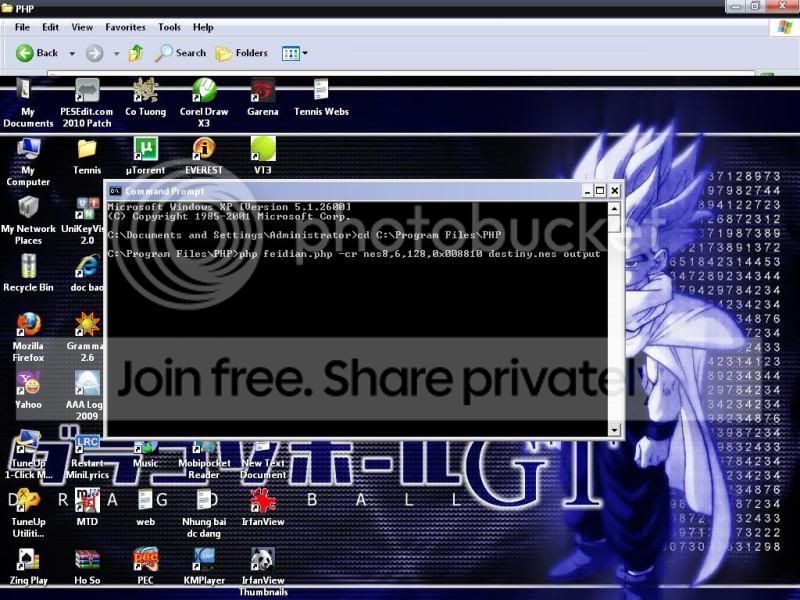
But when I press enter, it seems a number of errors appear, I couldn't get a bitmap that you mentioned

I'm waiting for your help.
July 14, 2010 at 4:29 am #38075ModeratorIt looks like it did the same thing that it did for my bro. I don't know why it's doing that. My guess is that the version of DOS isn't compatible with this version of Php.
July 14, 2010 at 4:35 am #38076ModeratorI would recommend posting on this forum for help:
http://sourceforge.net/projects/feidian/forums/forum/342273
Or find a Php guru… Also check the readme.txt that comes with feidian. It has some setup info.
I'm not a feidian or Php guru. I just know what to do to get the pics out…
July 14, 2010 at 4:41 am #38077ParticipantMy MS-DOS Version is 5.00.500.
Can you show me your path in "Environment Variables" ? ( right click My Computer and pick "Properties." Select the Advanced tab and click the Environment Variables button.)
This is my path : "C:Program FilesPHP" ( I deleted all the existing text and linked to where I installed PHP )
I wonder if this right or not ?
July 14, 2010 at 4:52 am #38078ModeratorI don't think Path is the problem. I don't have it in my path, I just cd to the directory.
-
AuthorPosts


- You must be logged in to reply to this topic.