Home › Forums › Destiny of an Emperor › Destiny of an Emperor RH Guide ( MOVED! to http://doaerhguide.wikidot.com )
Tagged: Battles, Destiny of an Editor, Destiny of an Emperor, Destiny of an Emperor hacking, Destiny of an Emperor Mods, Destiny of an Emperor Rom, DoaE rom, DoaE Rom hacking, FCEUX, Feidian, Graphics, hacking DoaE, Map, NES ROM hacking, nes8 template, Portraits, ROM Hacking, ROM hacking information
- This topic has 985 replies, 17 voices, and was last updated 2 years, 11 months ago by
MiDKnighT.
-
AuthorPosts
-
May 27, 2013 at 1:43 am #40401
ludmeister
ParticipantMiDKnighT–
That looks great. The only thing I could add would be to begin tactic names 1 character to the left, allowing the full 10 characters for names. It would also look aligned with your EQUIP box. My 2 cents.
When all else fails... manipulate the source code.
May 27, 2013 at 2:21 am #40402ParticipantMiDKnighT–
I have a theory about the freezing bug during battle… I just faced a battle with four tacticians, and after I won that battle I was attacked by two wimpy regular forces (obviously no tactics). I gave my officers orders because I wanted one of my officers to heal everyone, because the last battle hurt like butt. It froze the first time, at the beginning of the round, but the second time I selected my same orders, the game accepted it and played out the round. I believe this may be a bug in the AI, which is picking tactics for enemy officers.
Maybe this could help in tracking it down?
When all else fails... manipulate the source code.
May 27, 2013 at 3:59 am #40403MiDKnighT
ModeratorQuote:The only thing I could add would be to begin tactic names 1 character to the left, allowing the full 10 characters for names. It would also look aligned with your EQUIP box. My 2 cents.Ya that was just a bad copy/paste in MS Paint for the mock up. They are aligned in the real version.
Quote:I believe this may be a bug in the AI, which is picking tactics for enemy officers.I'm pretty sure it is. The only way I'm gonna be able to trap it is with a save state that catches the problem so I can trace it and fix it. Being that it's so rare it's nearly impossible to trace…
May 27, 2013 at 4:25 am #40404ParticipantHave you tried doing a breakpoint on write addresses 0x6205-620a, and watching what gets placed up there in the Hex Editor? That's what I'd try… It's not a problem with All-Out, so much, as I think it is getting confused with a tactics user from a previous battle (and DoaE doesn't overwrite the officers in the previous battle, if does not have to). In my testing something else, I could swear I saw the AI routine pick tactics for a dead officer…
When all else fails... manipulate the source code.
May 27, 2013 at 4:28 am #40405ModeratorIf that's the case a quick fix would be to clear 6205-620a after victory.
May 27, 2013 at 4:44 am #40406ParticipantThat's a possibility. Other possible fixes might be to clear $60AF-$60B3 (Enemy General IDs) and $65CA-$65E7 (Available tactics for the enemy).
When all else fails... manipulate the source code.
May 27, 2013 at 10:01 am #40407DragonAtma
ModeratorThis is a mockup.

Names, skills, and equipment can be as long as ten characters each. Army sizes can be as big as 999,999 soldiers.
(Disclaimer: not all of these skills and items are obtainable.)
May 27, 2013 at 2:30 pm #40408sonic.penguin
ModeratorAs cool as the setup and tactics are and equipping Game FAQ's :P, I think the version w/ stats underneath the character is just cleaner looking.
There is going to need to be an ingame tutorial on all the new stats and what they do though.
May 27, 2013 at 4:16 pm #40409ModeratorHere's the latest version. This is not MS Paint, this is all in-game. Although for now I'm setting values in memory for LDR, VIT, POL. I haven't coded how these get set yet.
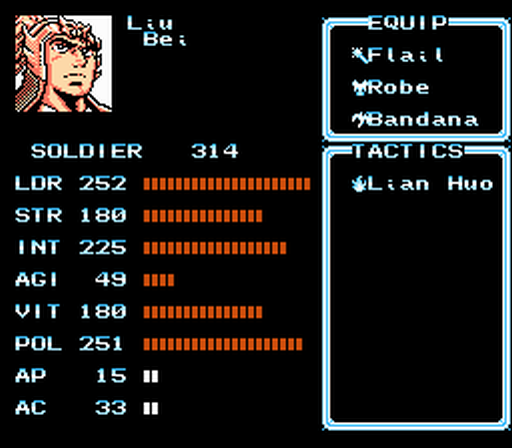
Questions:
1. Lud – do you remember how to change the palettes for different parts of the screen? I've done it before but can't remember. The bottom two bars need to be the same color as the bars above it.
2. Should I make the equip and tactic boxes wider and make the bars part a bit shorter?
May 27, 2013 at 10:14 pm #40410ParticipantQuote:1. Lud – do you remember how to change the palettes for different parts of the screen? I've done it before but can't remember. The bottom two bars need to be the same color as the bars above it.I don't off the top of my head. I'd need to look at my notes but am camping right now (I'm actually at a store to stock up on supplies that I left) :scratch: Sorry.
Quote:2. Should I make the equip and tactic boxes wider and make the bars part a bit shorter?I think that would be a great idea. The wider you make them, the more creative modders can be with item/tactic names.
When all else fails... manipulate the source code.
May 28, 2013 at 4:48 am #40411ModeratorTook a little while but I figured it out. Also had to put the palette pointers somewhere else to accommodate the size of all the new bars. Here's the latest layout – close to done?
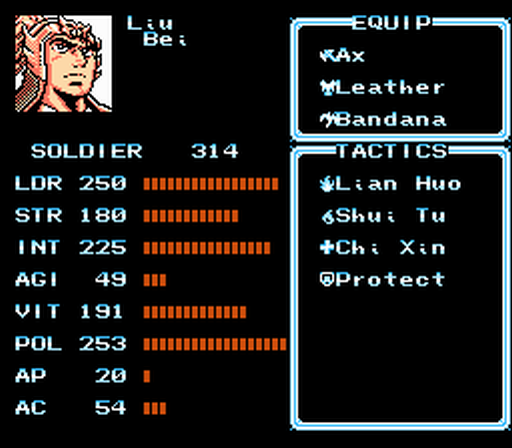 May 28, 2013 at 4:58 am #40412Moderator
Also I noticed that the text colors change depending on where your party is. Ie…the palette for the text keeps changing.
May 29, 2013 at 12:40 am #40413ParticipantLooks great! Sorry I wasn't around to help out in tracking down the palette stuff.
Quote:Also I noticed that the text colors change depending on where your party is. Ie…the palette for the text keeps changing.I've found that often, when traveling, the text is colored by the fourth color set. It usually pertains to water, but indoors it can sometimes look different than water (usually a floor tiling). The two-bit fontset requires a balancing act concerning the color the font should be, and how consistent you want the font coloring to be, based off of the colors that were set by the developers to set the moods for the various areas of the game.
When all else fails... manipulate the source code.
May 29, 2013 at 2:20 am #40414ModeratorQuote:Sorry I wasn't around to help out in tracking down the palette stuff.Hi lud, no problem, I had done it before just had to re-learn it.
Hey I was thinking the new attribute VIT would be perfect for your base AC enhancement. Have you considered using that instead of STR? Would be one of the first uses of the new attribute. Or if you want to get fancy, check to see if there is a setting for VIT, if not use STR. Or some kind of fancy formula combing STR and VIT.
To use VIT instead of STR all you have to do is change your lookup from $619C to $6410.
May 29, 2013 at 7:42 pm #40415ParticipantI have created the promised algorithm for Battle Spoils! :hook:
First, here are the Hex changes to the ROM. It requires at least a 512K ROM, and uses page 1E for its work.
0x3a547:
Code:"A900 8573 20D79A A202 1E0005 38 7E0005 CA 10F6" -> "a91e 2082c4 200d82 2095d4 ea a900 8573 20d79a"0x7a547:
Code:a90e 2082c4 4c50a5 ea 2082c40x7a560: This contains the algorithm guts. It decides whether something was found, and if so, whether it was a rare drop or not. Then, it picks a random item from 0 to 15, and gets that item from the correct chapter. Extra chapters are treated as the normal chapter of the same rank (Extended Wu would be treated as Wu).
Code:a202 1e0005 38 7e0005 ca 10f6 a5ad 6560
4a 65af 6510 297f c908 3005 a90e 4c40a5
65ae 4a 6561 6511 65ad 290f 856e ad3670
aa ca 8a 2907 0a 0a 0a 0a 656e 856e eaeaea
a5ae 6552 6511 6562 6563 297f c915 3010
a56e a8 b9d0a5 856e a900 856f 4c37a5 ea
a56e a8 b950a6 856e a900 856f 4c37a5 ea0x7a5e0 – 0x7a65f: These are the random common drops. 8 regions, 16 items per region. This item table just has ordinary items (Elixirs, Gullwings, Steeds, Power Pills, Revives, and Smoke Pots), except for one Red Hare in Wei's region.
Code:31313131313131313132303030282B2C
313131313131323232303030282B2C38
323232323232323330303028282B2C38
323232333333303028282B2B2C2C3838
32333333333330302828282B2C2C3838
33333333333334303028282B2C2C3838
34343434343434303028282B2C2C3838
343434343434302128282B2B2C2C3838EDIT: Alternately, this table weaves in some gold and ration drops:
Code:01010731313131313132303030282B2C
010208313131323232303030282B2C38
020309093232323233303028282B2C38
03040A3232333333303028282B2C2C38
04040A33333333303028282B2C2C3838
04050A0B3333333334303028282B2C38
05060B0C34343434343028282B2C2C38
060C0C34343434213028282B2C2C38380x7a660 – 0x7a6df: These are the random rare drops. 8 regions, 16 items per region. You will probably want to make these more helpful drops, such as equipment, as they can be offered rarely and thus can be made to not totally break the game. The format for this table is exactly the same as the common drop table.
Helpful tips to make Battle Spoils work for you
1. You can make all drops more or less common. The value to change is in this instruction:
Code:1E:A567:C9 08 CMP #$08This determines the chance, out of 128, to gain an item. Change 0x7a578, making it larger to make drops more common, and of course make it smaller to make drops more rare. Default drop chance is 8/128, or 1 in 16.
2. You can change the ratio of rare to common drops. The value to change is in this instruction:
Code:1E:A59C:C9 15 CMP #$15This is the chance, out of 128, that this current drop is rare, as when execution reaches this instruction, we know we are receiving a drop. Change 0x7a5ad, making the value smaller to make rare drops more rare, and larger to make them more common. If you change this value to greater than 0x40, you would be making "rare" drops more common than "common" drops– silly you :geek: . Default chance for this drop to be rare is 20/128, or 5 out of 32.
3. Obviously, you can change the items that drop. It does seem that you can make more gold coins or food rations drop. I don't recommend that you allow reception of items that you cannot sell or discard :wink:
I have tested this algorithm, and it will not bork the game if you don't have any space to put the item; it will just scream at you with the default message saying that you don't have any more room.
When all else fails... manipulate the source code.
-
AuthorPosts


- You must be logged in to reply to this topic.