Home › Forums › Destiny of an Emperor › Liu Biao mod underway!
Tagged: Destiny of an Emperor Mods
- This topic has 60 replies, 5 voices, and was last updated 13 years, 12 months ago by
cabalpapa.
-
AuthorPosts
-
May 18, 2012 at 4:26 pm #42306
cabalpapa
ParticipantWell, the first step is to have the exit warp come out where I want it to on the map. I see the editor has the regions broken into numbers (horizontally) and letters (vertically). Are those the actual numbers for the location to move it to? Unfortunately, there are no such labels on the map screen where we change the tiles.
May 18, 2012 at 4:58 pm #42307sonic.penguin
ModeratorAt this time, DOAEditor only moves the entrances. For caves/warps/ and resurrection cities, you'll have to edit the hex directly.
May 18, 2012 at 7:08 pm #42308ParticipantI understand that, but how do I know where to change the hex to? I don't know the code for the location I want the other warps to go to… I know it by the map, but not by the code.
May 18, 2012 at 7:45 pm #42309MiDKnighT
ModeratorQuote:I understand that, but how do I know where to change the hex to? I don't know the code for the location I want the other warps to go to… I know it by the map, but not by the code.Study the ROM hacking guide and you shall find the answers you seek. 8)
May 18, 2012 at 8:26 pm #42310ParticipantI am studying… and comparing… I'm having a horrible time. (One notable reason of my hard time is that I can't simply walk to my location of choice to see where it is and input that code. I need a way to know what locations are by seeing them on the map and knowing what to put into the hex… and so far, I can't seem to make that connection.
May 18, 2012 at 8:52 pm #42311ModeratorIf you're using FCE ultra, open you rom, click on Debug, then open 'Hex Editor'. Look at the value that reads 000060. Those FIRST 4 values is the cell you are standing on. I believe that further instructions can be found in the Romhacking guide.
May 18, 2012 at 8:54 pm #42312ParticipantBut I don't want the value of where I am standing. I do not have the ability to be standing where I want the location of. I want to know the location code without having to stand there. How do I find that?
May 18, 2012 at 8:58 pm #42313Moderatoruse these codes then. Open up the Debug menu, and open game genie decoder/encoder. In the box on the far right/top, type in NYONALAO, then click add to cheat list. That will enable you to walk wherever you want! Mountains, rivers, etc. You can thank MeteorStrike for that one.
If you ever want to delete the code, simply go to Tools-> Cheats, click on the code and delete it. Be careful, as with this code enabled you might accidentally walk off the map into the bug-zone. This is especially prominent in caves. If you walk off the map, you're a goner. Be sure to back up w/ savestates.
May 18, 2012 at 9:06 pm #42314ParticipantOk, this is quite helpful. Now, all I need to do is take the time to turn all encounters off for my map editing purposes and to fix them all later. Lol. Perhaps I can do it another way =). Thanks again. This will help me get started, I think. I understood most of what I was reading thus far (ok, after reading it like 5 times), but couldn't figure out how to get the info I wanted to put in. By the way, what Hex editing program are you using at this time? Not sure that the one attached to FCE actually allows me to change anything, but I have another one, too. XVI32… is that not a good one to use?
May 18, 2012 at 9:40 pm #42315ParticipantSuccess!!!! We have our first achievement of hex editing! Thank you much Sonic for holding my hand thus far. I had to find all the occurances matching the hex code for the location of Luo Sang to finally figure out which one referred to the exiting warp (found at 36000, btw). I have all the others changed right now, too, so I will have to find out what they refer, to… my guess is the gullwing and resurrect locations or some such. Sigh, this is going to be a long process, but with this first success will make others much easier! I'm so happy =).
May 18, 2012 at 9:59 pm #42316ParticipantSigh, and success only brings realization of another failure. Seems some of my map is whatever bug-zones you mentioned, though I am unsure as to why… it was perfectly within the parameters of the original map. I guess I will have to play with it.
May 18, 2012 at 10:06 pm #42317ParticipantUpon examination of this bugged out area, it seems that the tiles I have placed as all grass are bugging out. Changing them to trees, for example allows me to walk through them normally. Can anyone explain this?
May 18, 2012 at 10:32 pm #42318ModeratorThe all grass tile in the first column (far left) is safe to use. The one on the far right has a strange warp attribute connected to it. Don't use it.
May 18, 2012 at 11:45 pm #42319ParticipantLol, so I have an entire warp field? We're turning this into an alien game! Lol…
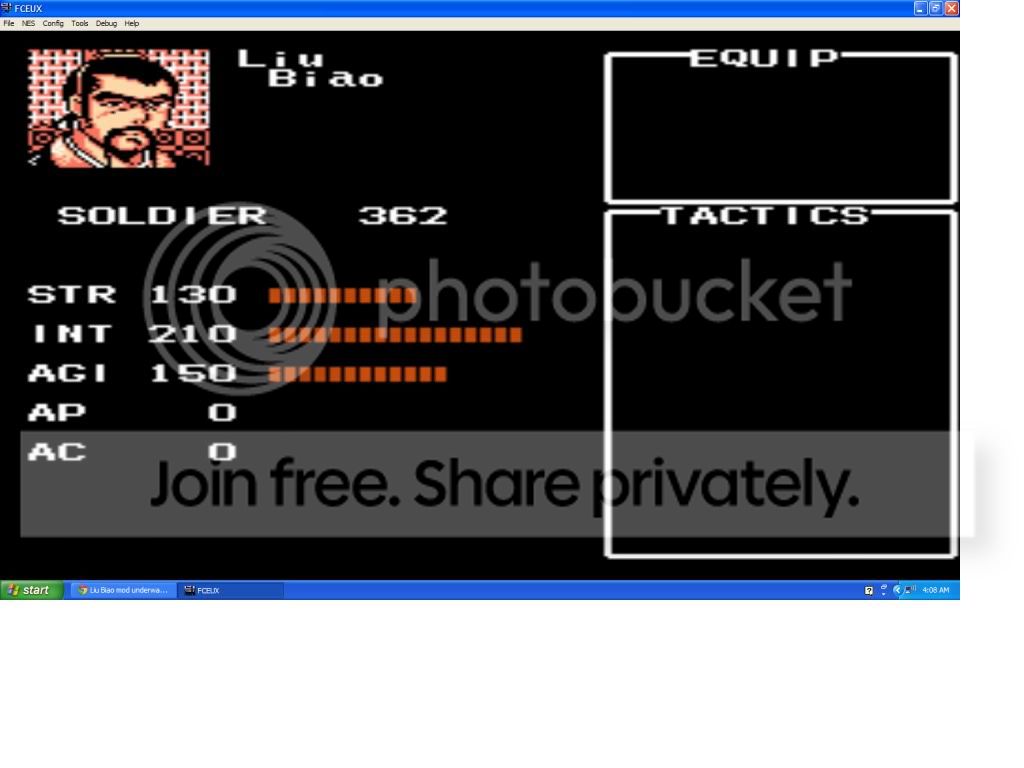
June 1, 2012 at 8:17 am #42320ParticipantOk, here is some proof that this is actually being worked on… The portrait is using just basic manipulation of stock frames right now, but besides the background, looks really good.
-
AuthorPosts


- You must be logged in to reply to this topic.