Home › Forums › Destiny of an Emperor › Destiny of an Editor (permanent beta test mode active)
Tagged: Destiny of an Editor, Destiny of an Emperor, Huo Hu, Niahak, ROM Hacking, Xian Zhu Xuande, Zhuge Liang
- This topic has 1,129 replies, 26 voices, and was last updated 11 years, 1 month ago by
MiDKnighT.
-
AuthorPosts
-
January 29, 2014 at 2:22 pm #53342
sonic.penguin
ModeratorIt worked when I changed the sprite, but when I just tried to change the coordinates it didnt seem to work. Will test more.
January 29, 2014 at 2:26 pm #53343ModeratorGot it. When I change the X,Y coordinates for Location or Region, it doesn’t save.
January 29, 2014 at 2:27 pm #53344MiDKnighT
ModeratorIt worked when I changed the sprite, but when I just tried to change the coordinates it didnt seem to work. Will test more.
If you change coordinates it must still be inside the “place”. Ie… if Cao Ren was in Luo Sang village he can only move to another part of Luo Sang village. If he’s going to move to a different town you’ll need to swap officer IDs with a villager in another town.
January 29, 2014 at 2:32 pm #53345ModeratorYeah I get it, I’m just trying to move a villager inside of the same town atm and its not saving.
January 29, 2014 at 3:52 pm #53346ModeratorBug Found: Sprite colors randomly change on their own to other palettes, like palette 2 changes to palette 4 randomly. Not sure what triggers this but something isn’t pulling data correctly.
Ignore the fact Xun Yu is in that battle, but Guan Yu should be Green not White.
I hacked Guan Yu into my party and he shows up green every time. Only thing I can think of that would have caused it is if his ap/sprite color identifier was not right. But if DoaEditor shows “Palette <#> Weapon <weapon>” it should be right.
January 29, 2014 at 4:29 pm #53347ModeratorFor some reason, my post saying it was a savestate issue that caused that bug didn’t post. Meh, yeah, I started a new game and it was fine, it was just something messed up in the SS. At any rate, The tile coordinates don’t save when trying to replace officers. Also, some sprites “duplicate” in towns. For example I put Xiahou Yuan in Chang An and I got two of him even though I tried changing the other sprite. I noticed that it does this even if you manually hex it in. If you try and put a recruit event {E91C] in w/ two of him floating around town, it locks up the game heh, so I had to pick another villager who wasn’t a duplicate.
Now I can’t move them both to the entrance because map coordinates don’t save, but sprites do.
January 29, 2014 at 4:50 pm #53348Niahak
ModeratorHey MiDKnighT,
What’s the planned feature you’re looking at next? Loading in graphics for the map tiles, or is the long-term plan to have every map section in the game editable?I’m not super familiar with how the graphics work (been a long time since I imported the portrait data!) in terms of palette selection. I can definitely help out with the mapping code, though. It has been a couple years since I touched it, so I might be a bit rusty.
January 29, 2014 at 4:59 pm #53349ModeratorHi Niahak!
The goal is to load all the map tiles from the ROM and have them editable including the world map, town maps, cave maps, and even interiors like castles and such. I’ve figured out most of it in the game.
See: http://doaerhguide.wikidot.com/#toc15
And I’m also at better at figuring this stuff out than when you made the original map editor so I can get you whatever you need to do it. If you’re interested in leading the DoaEditor side of this feel free. If not I can still do it, I just won’t be as efficient.
On another note, I’ve made quite a few changes to DoaEditor since you last saw. Check it out! The most features are visible if you have IPS patch 1.3 applied. My code isn’t quite as organized as yours so apologies for making any mess in your sand box. :wink:
sonic: I see the villager coordinates issues and I’ll fix it.
January 29, 2014 at 8:14 pm #53350ModeratorCat signal always works :thumright: Thanks for dropping by Niahak.
sonic: I see the villager coordinates issues and I’ll fix it.
It’s not the biggest issue in the world as I can still manually plug in the coordinates for moving around villagers now that that’s all mapped out in the rom per town which seriously made it a heck of a lot easier to edit sprite locations in FOW, but as far as functionality of DOAEditor it’s just another ‘to-do’ on the list.
Also, as far as the map editor goes, the “bulk” editing idea, while I understand the merit, might only be useful if you plan on covering the whole map with either water or mountains to build it from scratch, it just takes time to edit those map tiles, especially rivers, so they dont’ look as funky as they did in the first Rise of Lu Bu mod.
January 29, 2014 at 10:14 pm #53351ModeratorIt’s not the biggest issue in the world as I can still manually plug in the coordinates for moving around villagers now that that’s all mapped out in the rom per town which seriously made it a heck of a lot easier to edit sprite locations in FOW, but as far as functionality of DOAEditor it’s just another ‘to-do’ on the list.
Already fixed in my local version. It will go into the next update.
Also, as far as the map editor goes, the “bulk” editing idea, while I understand the merit, might only be useful if you plan on covering the whole map with either water or mountains to build it from scratch, it just takes time to edit those map tiles, especially rivers, so they dont’ look as funky as they did in the first Rise of Lu Bu mod.
I’d prefer to have both options at some point. When I increased the overall size I also increased the map editor size which provides the ability to do some better detail work (shorelines and such). But I’d also like a big map editor to edit entire towns or chapters at once. I’m thinking something like the region selector where you click a button and you get a bigger form where you can edit several regions at once. Until I hear Niahak’s response I’ll hold off on playing with the DoaEditor map stuff for now. But I will go ahead and finish up the map investigation in the game tomorrow which would help whoever does the map stuff whether it be Niahak or myself or both.
January 31, 2014 at 7:16 am #53377ModeratorI’ll be busy until Sunday sometime, so feel free to take an initial stab at the map stuff. If you get stuck, I can pick things up in a couple days.
My gut feeling is that this won’t be too bad as long as we take things one step at a time. I don’t expect people to drastically change the map (by e.g. adding new regions) yet, so we can probably just load all of the existing ones from known locations and don’t have to worry about new ones. That should mean you can just add the new regions and you’ll have some mapping capability (though the tile palette might be wrong). We can cannibalize some of the portrait loading logic to figure out the bit format for images. Stitching together the tiles might be a bit of a pain, but it’s something we did along the vertical axis for portraits, so again we have an example to work from.
January 31, 2014 at 7:29 am #53378ModeratorI’ll be busy until Sunday sometime, so feel free to take an initial stab at the map stuff. If you get stuck, I can pick things up in a couple days.
I’ll (mostly) wait for you to look and mess with other stuff in the meantime. I would never get it done before Sunday. I did add a class called LocationRef/locref to store coordinates and place names and IDs (although maybe it should go in “MapRegion” or “Locations”, your call. I also changed the loading order as warps would have to be loaded before the map. I’ll commit that update before Sunday.
My gut feeling is that this won’t be too bad as long as we take things one step at a time. I don’t expect people to drastically change the map (by e.g. adding new regions) yet, so we can probably just load all of the existing ones from known locations and don’t have to worry about new ones. That should mean you can just add the new regions and you’ll have some mapping capability (though the tile palette might be wrong). We can cannibalize some of the portrait loading logic to figure out the bit format for images. Stitching together the tiles might be a bit of a pain, but it’s something we did along the vertical axis for portraits, so again we have an example to work from.
Make sure you check out this and let me know if you need any additional info from the ROM: http://doaerhguide.wikidot.com/start#toc15
I’ll update it today to add more physical ROM locations for the lookup tables.
I actually “cannibalized” the portrait loading code myself to load sprites from the ROM. In doing so I made a color palette table that you can use (colors.tbl and colors2.tbl) that utilizes the full NES palette:
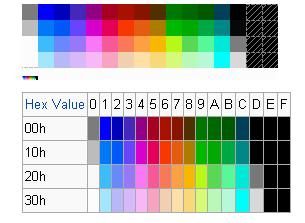
To fix the “wrong palette” issue I think we’ll need graphics and color drop down boxes on the map page to graphics and palettes. The main entries for graphics being:
World map graphics: 0x10010-0x1080f
Inside an Inn/House: 0x10810-0x1100f
Cave graphics: 0x11010-0x1180f
Inside castle graphics: 0x11810-0x1200f
Fortress graphics: 0x12010-0x1280f
Town graphics: 0x12810-0x1300f
Burnt Luo Yang: 0x13010-0x1380fFebruary 2, 2014 at 8:43 am #53398ModeratorI’m not seeing the update in source control. Did you by chance forget to commit the changes?
/edit: Also missing in source control:
DoaEditor\Villager.cs
DoaEditor\portraits\icon.ico-
This reply was modified 12 years, 4 months ago by
Niahak.
February 2, 2014 at 9:29 am #53401ModeratorSorry! Just updated.
-
This reply was modified 12 years, 4 months ago by
February 2, 2014 at 10:07 am #53405ModeratorColors2.tbl is missing, too, but that won’t keep me from doing some work on the mapping today.
-
This reply was modified 12 years, 4 months ago by
-
AuthorPosts


- You must be logged in to reply to this topic.