
Forum Replies Created
-
AuthorPosts
-
zhaoyun
ParticipantYeah, I'm using a XP-32 bit.
ParticipantQuote:Very difficultly. I just figured out how to do this last night. Trying to understand and change the hex in a game is rocket science.As such, are you planning on making a detail guide for us like what you did in FEIDIAN ?
It'd be very useful too.
ParticipantI tried it on another PC, but it still had the same problem. Perhaps I made some mistakes somewhere, but I don't know where they did come from.
ParticipantQuote:OK I found it. To change the gold key treasure chest to something else. Open the rom in a hex editor. At line 0x30930 change "23" to another number (another item). Possible items are:01 ~96 coins
02 ~237 coins
03 ~592 coins
04 ~1013 coins
05 ~1533 coins
06 ~4028 coins
07 ~29 food
08 ~125 food
09 ~821 food
0A ~2011 food
0B ~5902 food
0C ~10151 food
0D ~2098390 food
0E ~2148799 food
0F ~*86607 food [glitch]
10 [blank] ->
16 [blank]
17 Silver Key ->
18 Silver Key
19 Gemsword
1A Ma Letter [???]
1B Gun Powder
1C Intro Letr
1D Iron Ore
1E Dead Wood
1F Saltpeter
20 [glitch]
21 Chi Tu Ma [Red Hare]
22 Zhou Letr [Zhang Ltr]
23 Gold Key
24 Gullwing ->
28 Gullwing
29 [blank] ->
2A [blank]
2B Smoke Pot
2C Steed
2D Resurrect ->
30 Resurrect
31 Elixir A
32 Elixir B
33 Elixir C
34 Elixir D
35 Power Pill ->
38 Power Pill
39 Dagger ->
40 Dagger
41 Flail [Club]
42 Ax [Ax]
43 Club [Mace]
44 Spear [Flail]
45 Sabre [Spear]
46 Trident
47 Bow
48 Sword
49 Battleax [Great Ax]
4A Scimitar
4B Crossbow
4C Lance [Dadao]
4D Wan Sheng [Wansheng]
4E Bo Ye [Boye]
4F Qing Guang [Qingguang]
50 Nu Long [Nulong]
51 Qing Long [Qinglong]
52 Halberd
53 Robe ->
59 Robe
5A Leather ->
5B Leather
5C Padded ->
5D Padded
5E Ring M ->
5F Ring M
60 Chain M ->
61 Chain M
62 Splint M ->
63 Splint M
64 Plate M ->
65 Plate M
66 Bandana ->
68 Bandana
69 Cap
6A Hood
6B Wood H
6C Copper H
6D Bronze H
6E Iron H
6F Steel H
How would you able to figure this out ? Learning hex editor is an exciting thing.
ParticipantI see. So, I guess I will have to stop my plan, Ohhhhhhh
ParticipantMy MS-DOS Version is 5.00.500.
Can you show me your path in "Environment Variables" ? ( right click My Computer and pick "Properties." Select the Advanced tab and click the Environment Variables button.)
This is my path : "C:Program FilesPHP" ( I deleted all the existing text and linked to where I installed PHP )
I wonder if this right or not ?
ParticipantI did it, does it look like this ?
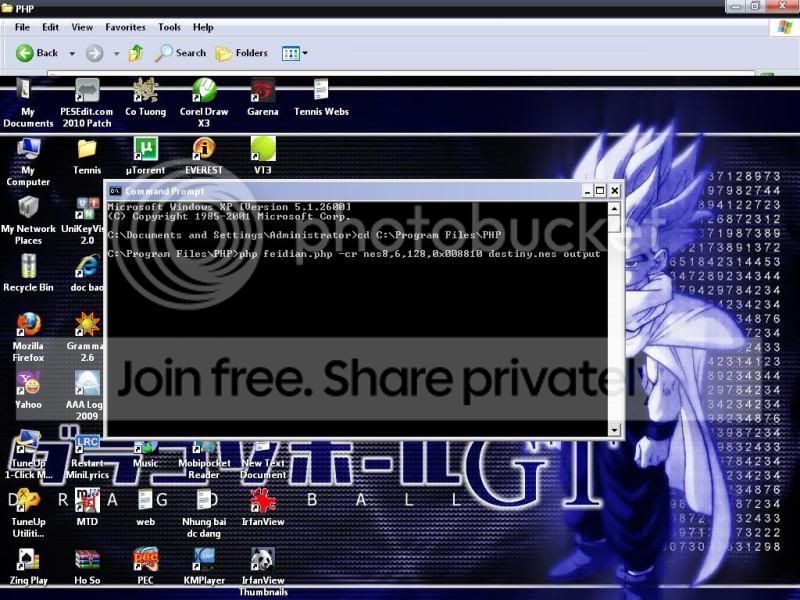
But when I press enter, it seems a number of errors appear, I couldn't get a bitmap that you mentioned

I'm waiting for your help.
ParticipantHere's my PHP directory, " feidian " is a thing that I marked, is that right ?

I can't open it up with PHP.
ParticipantHi all, I'm new and I have a question. How to use FEIDIAN ? It doesn't have a .exe file, and when I hear you saying that " Use Feidian to unload those portraits at the DOS prompt ", I haven't got a clue. I tried running PHP.exe and type the syntax you talked about but nothing happend at all. And what does " feidian script " use for ?
I run cmd ( Start/Run/cmd ) and type this, but it didn't work

-
AuthorPosts